Message from ADS Leadership-
Greetings, faculty and staff colleagues!
We hope you have had a wonderful start to the Summer semester. There are many fantastic initiatives and projects in progress both in our Department, and in Accessibility overall at the college. We want to be sure to highlight a few here!
–Distance Education Accessibility Drop-Ins
–TLED’s Faculty Growth Series
Guidance on Web Accessibility, with upcoming April Deadline!
–College Accessibility
Please take some time to review and enjoy the information below that our team has thoughtfully pulled together to keep you informed and supported.
Have a great semester!
-ADS Leadership
Important Reminders!
– If you encounter difficulties navigating anything related to accessibility and accommodations for your classes or students, please reach out to [email protected]. We are here to support you!
– If a student discloses a disability, diagnosis, or history of accommodations, or requests accommodations without official notification from SAS, please submit this Referral form. We will contact the student to make them aware of our services.
– To request a training, presentation, or other form of outreach or collaboration with Access & Disability Support (Student Accessibility Services), please complete the following Request Form.
– Need support or tips on how to best make your instructional materials most accessible to all your diverse learners? Check out Teaching and Learning Education (TLED): Accessibility.
-Take some time to review our webpage at austincc.edu/accessibility! We are in the process of updating much of our content, so continue to check in and familiarize yourself with all kinds of helpful information!
AIM Version 5
AIM Version 5 is here. While the core structure of the faculty profile will remain familiar, this updated version introduces several enhancements designed to improve the user experience for students, faculty, and staff.
What’s new for faculty in Version 5:
- SAS Websites have been updated to provide detailed information on how to use new features in AIM.
- Faculty AIM information
- Faculty SAS Testing
NEW! Summer 2026 Pilot: FLEX PLAN
With the updates in AIMv5, there is a new module that is being piloted to support students who are approved for flexible deadlines and attendance. Currently, attendance and deadline flexibility is discussed through email or in-person. The new module will provide resources and a questionnaire to support implementation of the accommodation in courses.
Currently, we are running a small cohort of students and faculty with a district-wide launch scheduled for a future semester.
Student Spotlight!
Suha Kavakli is current SAS student who earned her GED at ACC, completed TSI Prep courses and the ESOL program, and is now taking college credit pre-requisite courses to pursue a health sciences degree. Suha’s success is the result of her own relentless determination, with the support of a wide range of ACC partners (Adult Education, ESOL, tutoring and SAS, among others). She was recently celebrated for her drive and tenacity as a featured student speaker during this May’s National Adult Educaiton Honor Society (NAEHS) Ceremony held at ACC’s Eastview Campus (listen to her share her inspiring story, and words of wisdom, starting at minute 17). Suha’s story was also featured on NPR’s Marketplace podcast – you can read the article here, or start listening for Suha’s story about 15 minutes in.
In April 2026, our very own ACC student, Mark Olaiz, led an engaging presentation entitled Disability Pride as Resistance. He taught us about the changing models of disability, relevant laws, and how to advocate for yourself and others. More about Mark in his own words:
“I am on a mission to show the world that ‘unique abilities’ are not barriers—they are powerful perspectives that make our communities stronger. My journey began in Granbury, Texas, a small town where resources for someone living with Cerebral Palsy and visual impairment were almost non-existent. I learned early on that when the system isn’t built for you, you have to be the one to unlock the door.
I moved to Austin because I refused to let a lack of resources define my potential. Since then, I have dedicated my career to breaking glass ceilings and creating paths for others. From serving as the first visually impaired front desk worker at the Greater Austin YMCA to my extensive work in the Texas education system—supporting students from preschool through high school—I have seen firsthand where our systems succeed and where they fall short.
Most recently, I have taken my advocacy to a larger stage, appearing on Austin’s local news for ‘Medicare Mondays’ to speak on healthcare accessibility and policy. Currently, I am advancing my studies in Vocational Rehabilitation to further my goal of educating schools, employers, and public spaces on the necessity of universal design. I don’t just advocate for a single diagnosis; I advocate for a world where every individual, regardless of their disability, has the tools, the access, and the community support to live independently and build the life they want.”
Find him on tiktok: blindeducatedmartinez and instagram: daredevil_blind_2.0
Sign Language Interpreting & Captioning:
To ensure timely and equitable communication access for students and prospective students, please follow the process below when requesting an American Sign Language (ASL) interpreter-
For planned interactions (3+ business days’ notice):
Please submit a request using the SLIC (Sign Language Interpreting and Captioning) form:
Providing advance notice helps us secure appropriate interpreting services and ensures a smooth experience for both staff and students.
For immediate or walk-in support:
If a student requires an interpreter on short notice, please use Google Chat:
- Search for: “ASL Interpreter Needed”
- Send a message with the request details in real time
You do not need to be a member of the chat to send a request this way!
Captioning-
For captioning requests, please use the handy Media Captioning Request Form.
To Request Captioning:
All audio/video material used by/within ACC should be captioned, whether used for classes, events, staff/faculty training, marketing, or anything else.
Examples include:
- A pre-recorded lecture
- A video on YouTube relating to the topic of a class
- A video included with the electronic version of an assigned textbook
- A PowerPoint presentation with voice-over narration
- A recording of an online class session
Adding accurate captions ensures ACC fulfills our legal obligations and lives up to our credo that ACC is for everyone. Besides providing equal access for our Deaf and Hard of Hearing students and employees, captions are frequently utilized by hearing viewers to aid in comprehension.
Automatic captions, as provided by platforms such as Panopto, YouTube, and Zoom are not good enough! Captions should be at least 99% accurate to ensure full compliance, and automatic captions are rarely capable of reaching this standard.
Submit requests to our Captioning department using the online request form at https://www.austincc.edu/captionrequest. This service is provided at no cost to ACC faculty/staff and their departments.
SAS Testing:
Getting Started: Faculty AIM Testing Guide
Review student’s Faculty Notification Letter
- Discuss with students if they will be testing outside the classroom (Testing Center or SAS Virtual Proctoring).
Submit an Alternative Testing Agreement Form
- For detailed AIM instructions, including how to complete testing agreements, copy forms, or submit exams, please visit the Faculty- Using the Alternative Testing Module in AIM on the SAS Testing website.
- Complete the Alternative Testing Agreement Form in AIM. Exams will be administered according to the instructions in that form.
Submit Exam Dates
- Exam Dates allow professors to create individual entries per exam.
- To ensure students have sufficient time to submit their accommodation requests, we recommend entering all exam dates at the start of the semester.
- Please note that the system only allows one exam deadline per day.
Accommodations in Blackboard Ultra
- Please use the Accommodations Feature in Blackboard Ultra to set up Extended Time. Click here for instructions.
- Once an FNL is received, all exams for the semester need to include extended testing time.
- For accommodations that are incompatible with Respondus, assessments can be duplicated in Blackboard Ultra.
If you have any questions about the AIM testing module, please contact [email protected].
Adult and Continuing Education:
- Our SAS team has two Accessibility Advocates dedicated to working with Adult Education and Continuing Education students across the ACC district.
- Emily Perhamus and McKenzie Van Cleave support students needing accommodations or other disability-related support to participate in any Adult Education or Continuing Education course. We are available by appointment to meet with students in-person at any ACC campus, or by phone/virtually. We’re also here to consult and collaborate with Adult/Continuing Education instructors, coordinators and support staff. Please don’t hesitate to email Emily and McKenzie together at [email protected] to let us know how we can support you, your programs and our students. Accessibility is a shared responsibility!
- Emily Perhamus can be reached at [email protected], 512-223-5265 or via calendly
- McKenzie Van Cleave can be reached at [email protected], 512-223-5264 or via calendly
- NEW AE/CE and STEPS SAS Application in AIM v5:
- Adult/Continuing Education students, and students in our STEPS program, now have a specialized application available in our updated AIM portal to get directly connected with the AE/CE SAS Team for support.
- Now, when students visit austincc.edu/sas and click on “Request SAS Services” they will be directed to an application landing page in AIM. They can click “Start New Application” below “SAS Adult and Continuing Education students” or “STEPS Students” to initiate the accommodation request process.
- We are available to assist students, or answer questions related to this updated application process – please contact [email protected]
- Referrals: For students you believe may be in need of support from Student Accessibility Services (SAS) because they have disclosed a disability or you suspect they may be in need of disability-related support services, please remember to complete the Basic Needs System referral form to get the student connected with our office and other services they may need. You’re also welcome to make a direct email introduction to Emily/McKenzie if you believe this will better meet the student’s needs!
- Emily Perhamus and McKenzie Van Cleave support students needing accommodations or other disability-related support to participate in any Adult Education or Continuing Education course. We are available by appointment to meet with students in-person at any ACC campus, or by phone/virtually. We’re also here to consult and collaborate with Adult/Continuing Education instructors, coordinators and support staff. Please don’t hesitate to email Emily and McKenzie together at [email protected] to let us know how we can support you, your programs and our students. Accessibility is a shared responsibility!
- Adult Education
- HSE/High School Equivalency Students: Accommodations for GEDReady (official practice) and official GED tests can only be approved by GED.com. HSE students take GED Ready at the end of each term. While we cannot approve/deny these requests, Emily and McKenzie from the SAS Adult/Continuing Education team are here to assist you along the way. Contact [email protected] to let us know how we can help!
- TSI Prep Students: Please remember that TSI testing with accommodations requires that an appointment be made in advance. Contact [email protected] as soon as possible (at least 5 days before you plan to test) for support with making an appointment to take TSI with accommodations.
- ESL and Career Pathways Students: We’re here to support you, too! Contact [email protected] to discuss your disability-related needs.
- Continuing Education
- Yes, accommodations are available for Continuing Education (CE) courses, too! Please encourage students to contact [email protected] as soon as possible to get accommodations set up, or for any questions/concerns regarding accommodation access for current/upcoming CE courses.
Alt Text & Media:
Alt Text & Media works with faculty to help ensure course materials are accessible for students with disabilities who use assistive technology or need alternative formats such as braille, large print, accessible digital text, or tactile graphics.
For resources and support on accessible course design, please visit the TLED Accessibility and Distance Ed Accessibility pages.
Access Planning Meetings-
Please attend any Access Planning Meetings you are invited to. These meetings are especially important for students who are blind or have low vision because they help shift the accommodation process from reactive to proactive.
Access Planning Meetings bring faculty, Student Accessibility Services, and Alt Text & Media specialists together to identify potential barriers before the semester becomes overwhelming for the student. Because accommodations for blind and low-vision students are highly individualized, these meetings help faculty understand the student’s specific tools, formats, and access needs rather than relying on assumptions.
Early planning supports ADA and Section 504 compliance, reduces last-minute accessibility issues, and helps ensure students have timely, meaningful access to the same learning opportunities as their classmates.
Thank you for your partnership in supporting equal access for students in your courses
Assistive Technology Spotlight: Genio Notes (Formerly Glean):
Genio is an advanced, all-in-one digital note-taking and audio learning platform designed to support students who face barriers with traditional note-taking during lectures. By recording live or online classes, the software automatically syncs the audio with lecture slides and student notes, providing live captioning to ensure comprehensive content capture. It features built-in AI capabilities that transform these recordings into structured summaries, outlines, and custom study aids like flashcards and practice quizzes.
Additionally, the platform features a new tool called Genio Present, a guided presentation-rehearsal tool launched in January 2026 that helps students reduce presentation anxiety and build oral communication skills. It provides a safe, private space to rehearse with video, audio, and slide recording while offering structured goals, optional timers, and self-reflection tools like confidence tracking and filler-word detection. With optional AI insights for actionable feedback and the ability to share recordings with tutors or peers, Genio Present builds long-term communication skills and supports students with learning differences who thrive in a low-pressure rehearsal environment. For a deeper overview of how this technology integrates into the classroom environment and benefits pedagogy, staff members can explore the dedicated Genio Faculty Page.
Because our institution fully sponsors premium licenses for students who require this software as an academic accommodation, eligible students can access Genio completely free of charge. While the standard Get Genio Free page outlines general eligibility and trial options, students approved for this accommodation do not need to register for a commercial trial; Student Accessibility Services (SAS) will provide them with a dedicated institutional access link to set up their fully funded premium account. If you believe a student in your course could benefit from these note-taking accommodations but is not yet registered, please submit this Referral form. We will contact the student to make them aware of our services.
Upcoming Events:
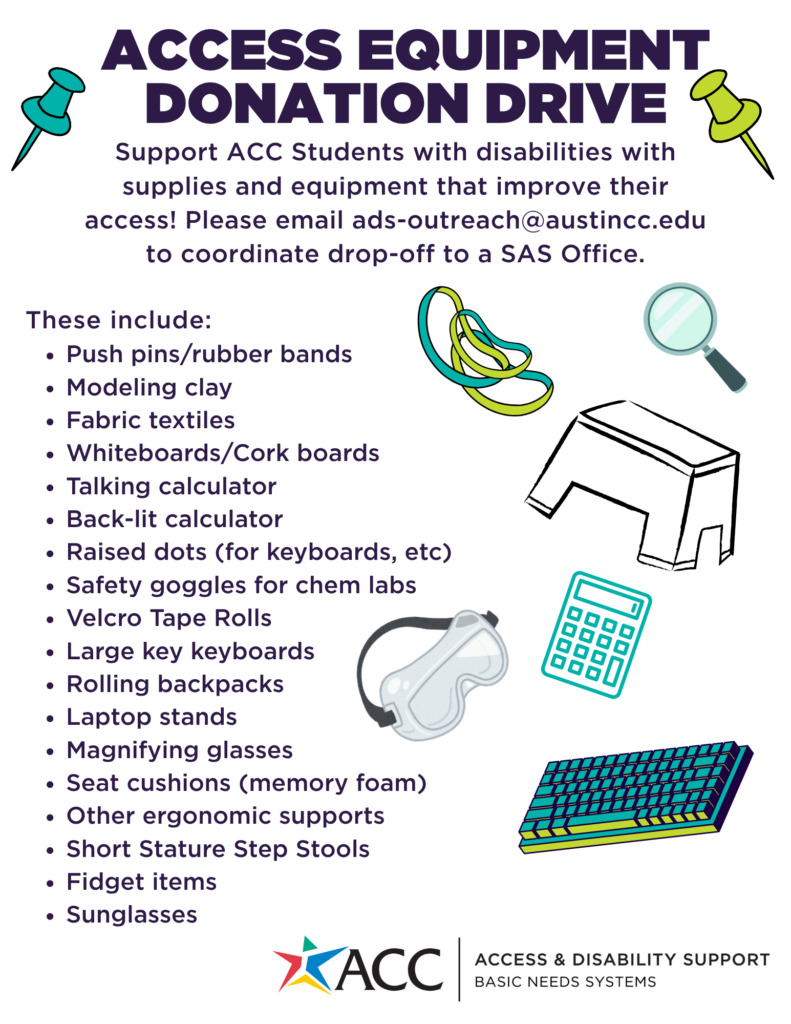
Access Equipment Supplies Donation Drive-
Help support ACC students by donating accessibility tools that enhance learning participation, and classroom comfort. Donations ca be dropped off at any Student Accessibility Services (SAS) office across the district. Please email: [email protected] to arrange your drop-off. Thank you for supporting accessibility and helping us provide access-enhancing tools for ACC students!

Follow us on social media!
Austin Community College’s Access & Disability Support/Student Accessibility Services (SAS) is excited to announce we are now on Instagram and Facebook!
We are building an inclusive online space to share information, foster accessibility, and stay connected with you. Follow us to stay up to date with:
- How-to’s and tips: Learn to use our AIM database, schedule tests, and more.
- Advocacy: Check out highlights, student stories, and information on your rights.
- Resources: Find upcoming events, campus resources, and disability community news.
Follow and share:
Instagram: @accdisabilityservices
Facebook: ACC Access & Disability Support